¶ Admin Configurable Products - Variants UI Setup
Design for the product variants setup in the Admin.
¶ UI and Behavior Spec
-
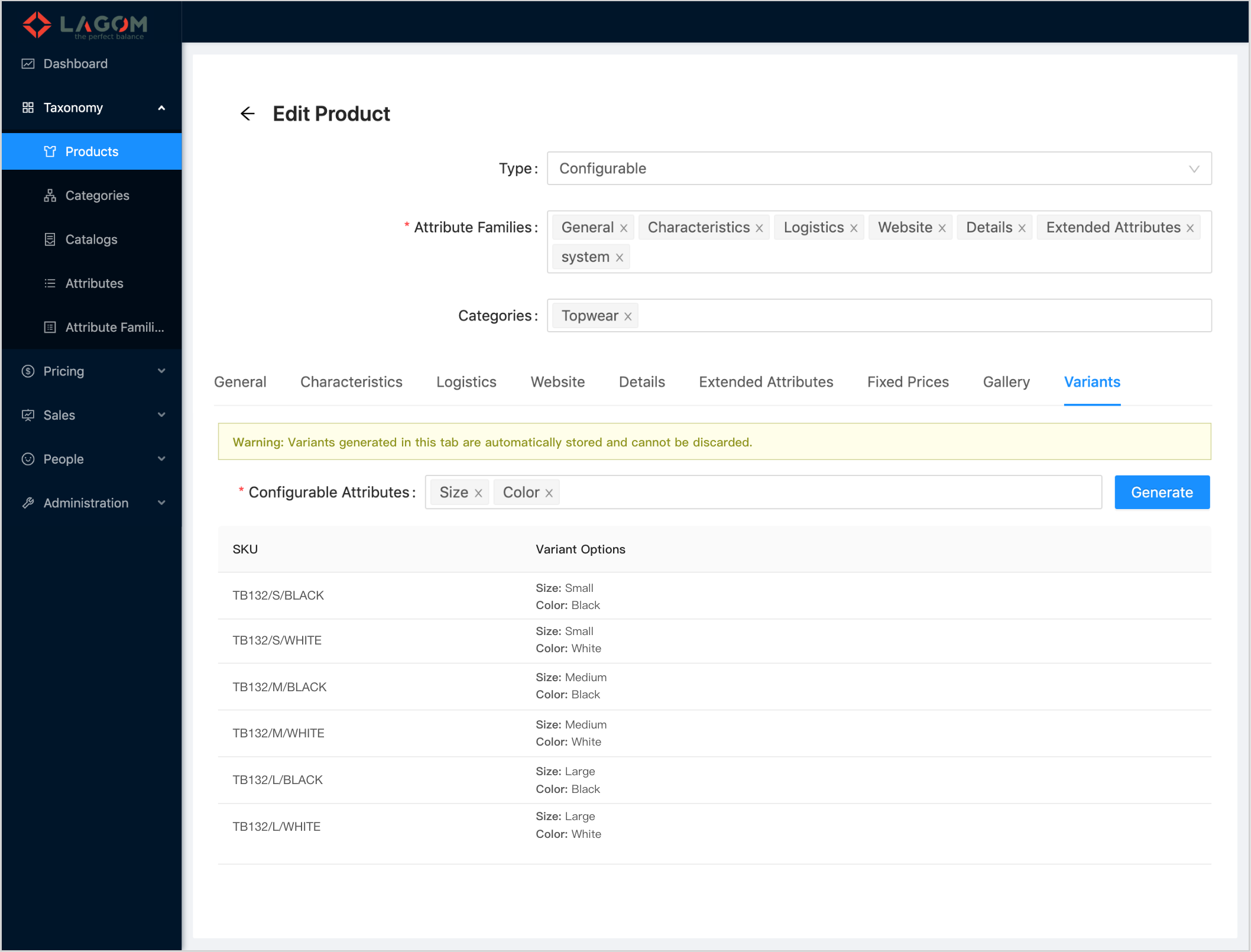
A new tab is added to the end of the row
- The tab label is "Variants".
- The tab is only visible when the selected "Type" is "Configurable".
-
Variants tab content:
The new tab has these elements:
¶ Warning Message
A warning message is on top of the Variants tab.

Text: "Warning: Variants generated in this tab are automatically stored and cannot be discarded."
Format: The sub-text "Warning:" goes in bold weight font. The rest in normal weight.
¶ Configurable Attributes
A new field to store the configurable attributes is added to the Variants tab.

-
The field is a sorted multiselect with suggestions. Suggested values are only the List attributes. That is, the attributes of type
stringwith aninclusionvalidation. -
Values selected in the multiselect cannot be repeated.
-
Label: "Configurable Attributes"
-
Required: Yes, only for Configurable products.
Integration
- The field is mapped to the system attribute
configurableAttrs.
Behavior
- A change on this field makes the "Discard changes / Submit" bar to appear the same as other fields.
- These changes are stored only when the product is saved, the same as for the rest of the attributes.
¶ Generate Button
A button is available on the Variants tab to regenerate the product variants for the configurable.

- Label: "Generate"
- Enabled/Disabled: The button will be only enabled when editing a product. That is, when creating a new product, this button will be disabled.
Integration:
This button will call an API service to regenerate the product variants when it is required by the operator.
- API endpoint:
POST /products/{id}/children/generate - API endpoint params:
- id [path param, required]: The configurable product Id.
- configurableAttrs [query param, optional]: The list of the attribute Ids selected in the "Configurable Attributes" field, in JSON format (
{"ids": [ 'the list of ids' ]}).
- API endpoint body: Empty (no body).
- API call example URL path:
/products/{id}/children/generate?configurableAttrs={"ids":["00de4b03-b2d7-4597-a11f-88b9d97d9f03","f82e0ddb-f297-40e4-b4ba-b068b2f216a9"]}, where00de4b03-b2d7-4597-a11f-88b9d97d9f03andf82e0ddb-f297-40e4-b4ba-b068b2f216a9would be attribute Ids.
 Note that if the param
 configurableAttrs is omitted, it defaults to the attributes stored as configurabled attributes in the configurable product. So, this parameter must be sent to make sure the generation considers the attributes specified by the operator, even when the product has not been saved yet.
When the API call returns, the variants grid must be refreshed to make sure it shows the latest available variants (see section Variants Grid for more details).
¶ Variants Grid
On the main area of the Variants tab, there is a new grid that renders the product variants for the configurable product.
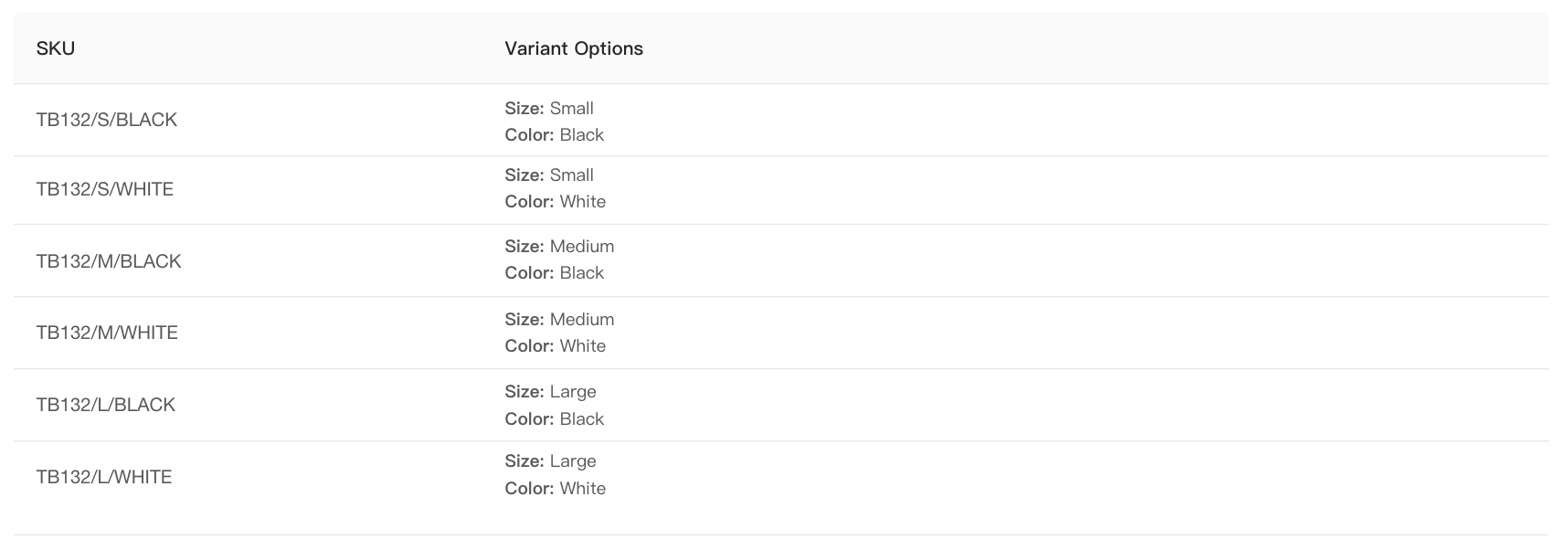
Grid colums:
- SKU: Mapped to the attribute
sku. - Variant Options: Mapped to the attribute
variantOptions:- The attribute
variantOptionshas the form:
For example:{ "attr Id 1": "attr value 1", "attr Id 2": "attr value 2", ... }{ "00de4b03-b2d7-4597-a11f-88b9d97d9f03": "s", "f82e0ddb-f297-40e4-b4ba-b068b2f216a9": "black", }- In order to generate the UI value for this grid column, the related attribute models must be obtained by the Ids in
variantOptions, and then:- Take the attribute
descriptions (in the example they would be "Size" and "Color"). - Take the titles of the values (in the example "Small" from the option value "s", and "Black" from the option value "black").
- With this information, the column format is:
- One line for each configurable attribute.
- Each attribute description in bold font, folowed by
": "and then by the option title in normal font (see image above).
- Take the attribute
- The attribute
Integration:
- In order to get the variant products, the API endpoint to be called is
GET /products/{id}/children
And additionally if required, the quantity can be obtained calling:
GET /products/{id}/children/count
In both services, the path param id is the configurable product Id.