¶ Feature
The idea is to manage notifications in the Admin app. The operators will be able to have a frienfly interface where to be notified about relevant event in the system and the store.
Also the operators will have the possibility of managing the notifications in a more detailed grid view.
Notifications will be configurable at operator level so every Admin user can specify which events are of interest and which aren't, so only important notifications are receibed.
¶ API
¶ Model
The main entity for the notification center is the Notification, that represents a notification of any type specifically sent to an operator.
Besides the standard fields id, companyId, createdAt, and updatedAt, the Notification entity will have the fields:
- Content (
content): [string] The text of the notification. - Status (
status): [stringenum"read"|"unread"] Status of the notification. If not present, it defaults to"unread". - Group (
group): [string] Group of the notification. It is a small text that can be used to classify the notifications with different criteria. For example to be used to group the notifications in tabs in the notification center. Examples of groups could be "general", "warning", "critical", etc. If not present, it defaults to"general". - Type (
type): [string] Type of the notification. It is a samll text to identify which event has happened and is being notified. For example "import-finished", "new-customer-message", etc. This field could be used in the notification center to define the little image to show on the left of each notification. If not present, it defaults to"general". - Recipient (
operatorId): [string] The id of the operator that the notification is directed to.
¶ Services
- List own notifications (
GET /notifications/mine[available foroperator]): Lists the notifications of the caller operator. The service support the standard query parameterfilter. - Count own notifications (
GET /notifications/mine/count[available foroperator]): Count the notifications of the called operator. The service support the standard query parameterwhere. - Mark notifications (
PATCH /notifications/mine[available foroperator]): Updates the notifications of the called operator. The only field that can be updated isstatus. The service support the standard query parameterwhere. - Delete notification by id (
DELETE /notifications/{id}): Deletes a notification by id. - Mark notification by id (
PATCH /notifications/{id}): Updates a notification by id. The only field that can be updated isstatus.
¶ Notifications
The notifications to be implemented in this first version are:
- Welcome (
"operator-welcome"): An initial notification for new operators. - Import finished (
"import-finished"): An importation process has finished (with success or error). - Catalog synchronized to store (
"taxonomy-synchronized"): The products, categories and related information loaded in the Admin is synchronized to the Store. - New message (
"message-new"): A new message from a guest or customer has been sent.
¶ Admin UI
¶ Notification Center
The notification center UI will be a new section accessible through a bell icon in the Admin header.
This icon will show the quantity of unread notifications for the current operator.
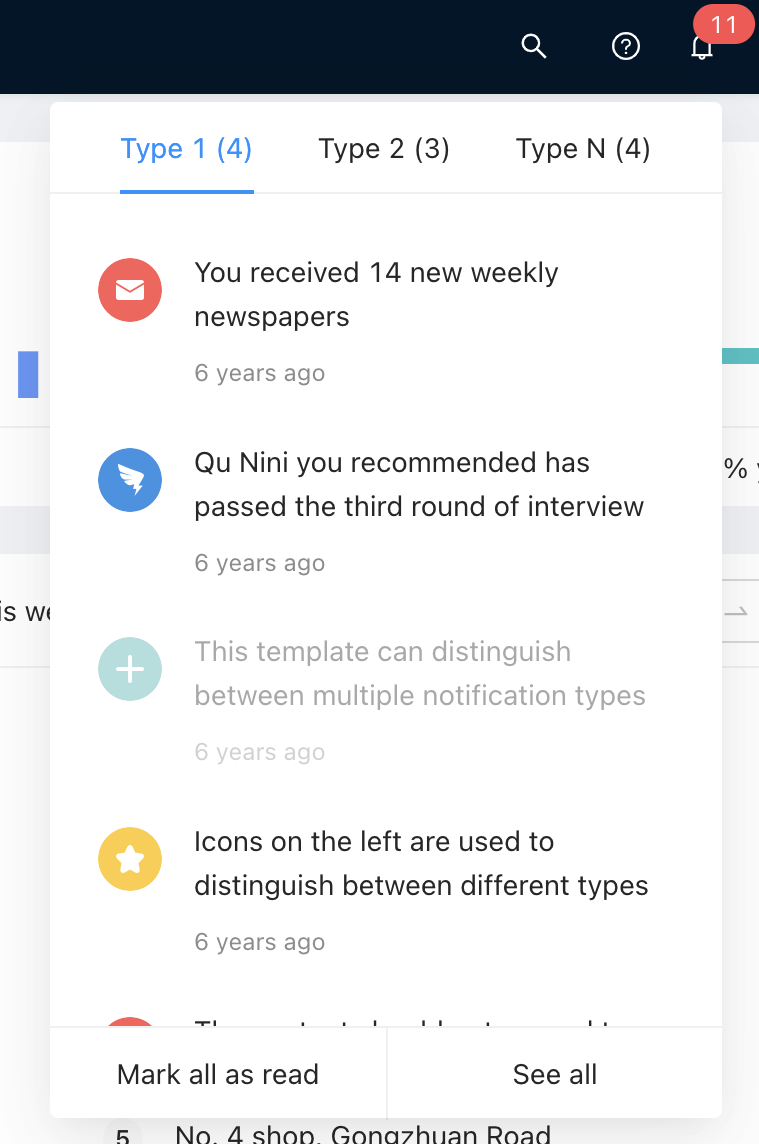
When clicked, the UI is expanded (see example in Ant Design Pro site)
¶ UI with notifications
The UI shows the list of notifications from the last 30 days groupd in tabs by notification group:
¶ UI without notifications
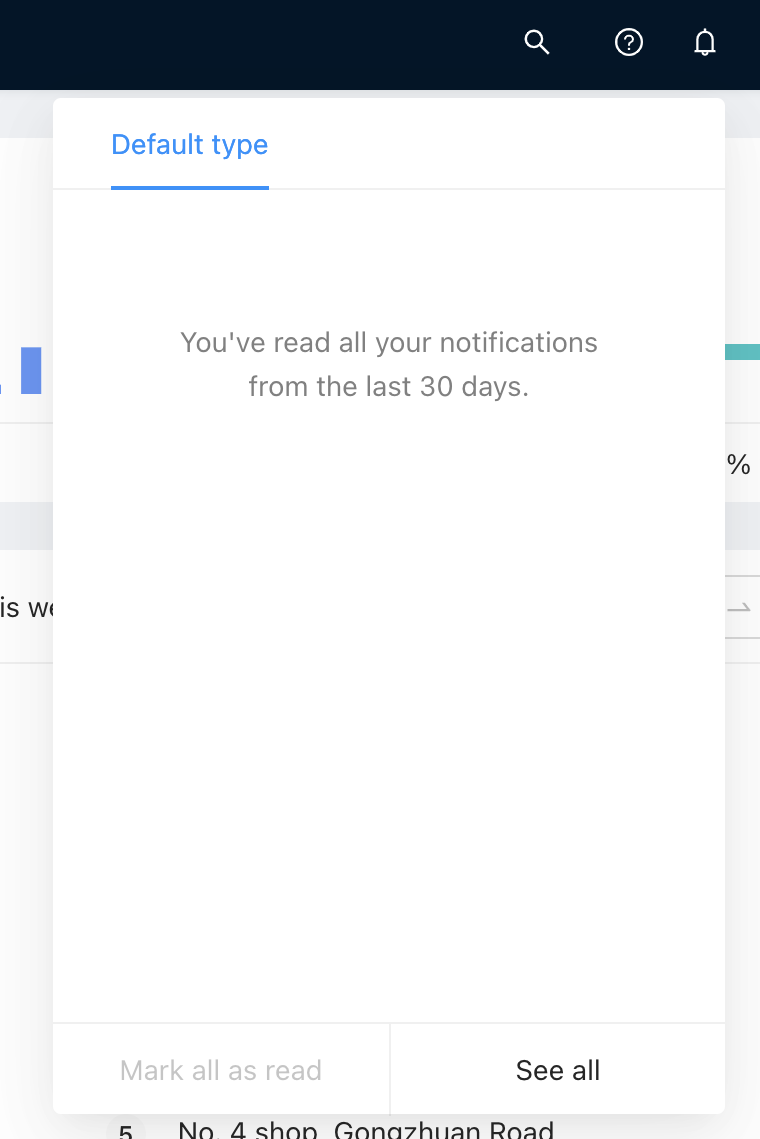
If the current operator has no notifications in the last 30 days, the UI shows its empty version with the default group "general", and a copy saiyng there's no notifications to show:
¶ Parts of the UI
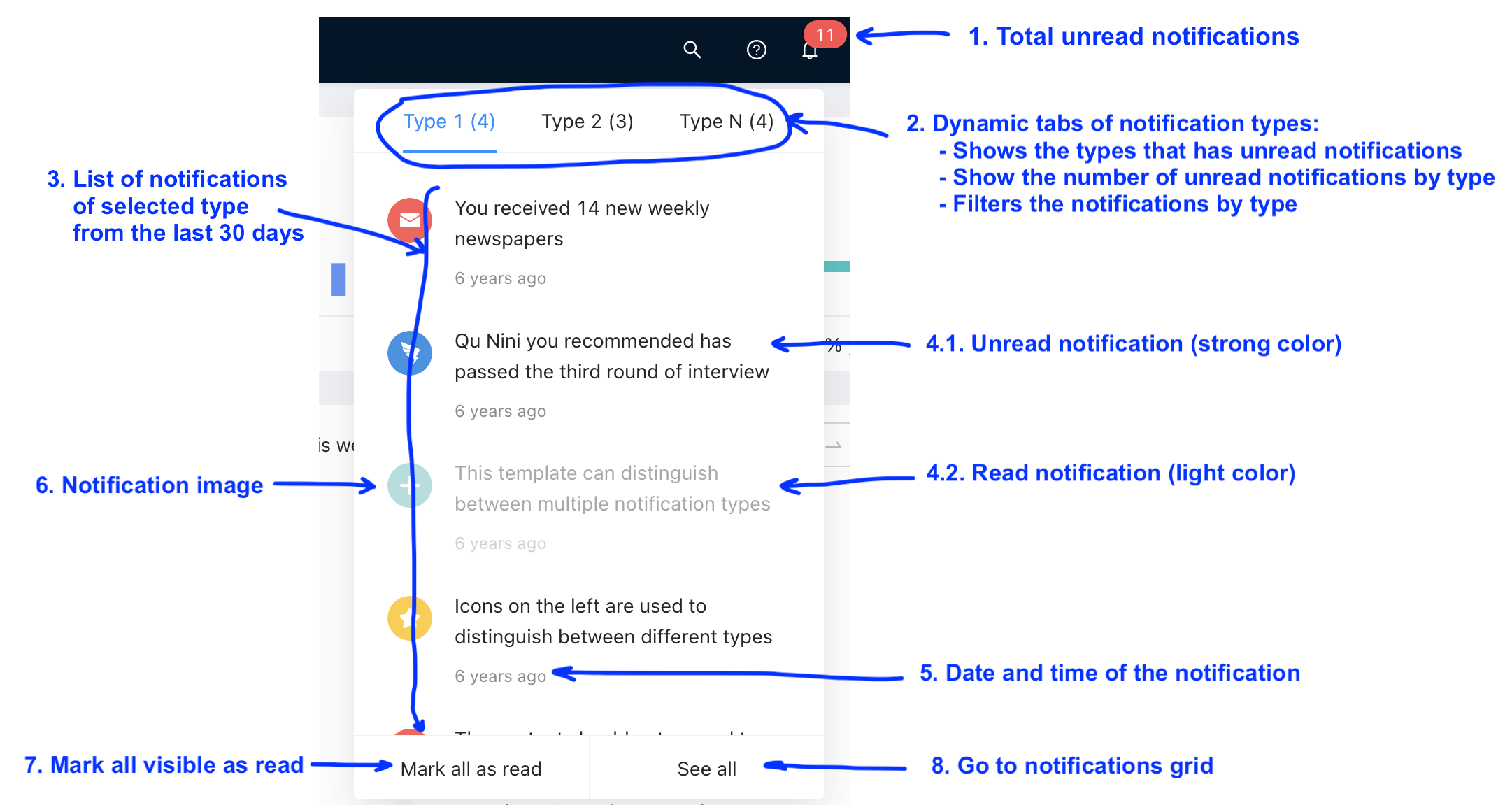
1. Notifications icon
- Bell (
<BellOutlined />) icon on the left of the operator name. - Shows a badge with the number of unread notifications for the current operator, in the last 30 days. I there are no unread notifications in this period, the badge is not shown.
- When clicked, the notification center UI toggles between expanded and collapsed (see Ant Design Pro site as an example).
2. Dynamic tabs
- The top part of the notification center is a set of tabs formed by the
groupof the returned notifications. For example, if the API returns notification of groups "critical" and "general", there will be two tabs, "Critical" and "General". So, the number and titles of the tabs are variable. - The only exception is when there are no notifications returned by the API. In such a case, one tab "General" will be shown, as described in UI without notifications section.
- Each tab shows the unread notifications on its group.
3. List of notifications
- Each group tab shows the notifications of the corresponding group, from the last 30 days, sorted by
createdAt DESC(newer on top). - The notifications show:
- The text in the notification
content. - An icon that depends on the notification
type.
- The text in the notification
4.1. Unread notifications
- The unread notifications are shown with a strong font color.
4.2. Read notifications
- The read notifications are shown with a light font color.
5. Notification date and time
- The
createdAtdate and time of the notification is shown in the "ago" format. An external library could be used to show that format, such as javascript-time-ago.
6. Notiication icons
- All notifications will show an icon depending on the
type:- Welcome (
"operator-welcome"):<UserAddOutlined /> - Import finished (
"import-finished"):<ImportOutlined /> - Catalog synchronized to store (
"taxonomy-synchronized"):<SyncOutlined /> - New message (
"message-new"):<MailOutlined /> - Unknown (any other value):
<NotificationOutlined />
- Welcome (
7. Button to mark all as read
- When clicked, all notifications in the last 30 days of the selected group (in the current tab) are marked as read.
8. Button to see all notifications
- When clicked, the user is taken to the notifications grid, and the Notifiation Center is collapsed.
¶ Behavior
- The notification center will be updated each 5 seconds, using the polling strategy.
¶ Grid
The grid of notifications will show all the notifications for the current operator, allowing to search, filter, sort and mark as read or unread.
Columns:
- Content (
content): Sortable, filterable. - Date (
createdAt): Sortable, filterable. - Status (
status): Sortable, filterable. - Group (
group): Sortable, filterable. - Type (
type): Sortable, filterable. - Actions:
- Button to mark as read (for unread notifications)
- Button to mark as unread (for read notificactions)
- Button to delete
Sorting: By default the grid is sorted by createdAt DESC (newer first).