¶ Data Model

¶ Details
ProductandCatalogentities and collections have no changes.- A new entity and collection
ProductCatalogis created to maintain a reverse index. For each product in the main catalog, a document is created inProductCatalogidentified by the product id, and including an array of the catalog ids it belongs to. - For each catalog in
Catalogcollection, a new collection is created, with a name identifying the catalog. - A new entity and collection
CatalogCategoryis created to maintain an index with the categories that are part of a catalog.
¶ Catalog Indexing Process
The indexing process consists in determining the set of products that belong to a catalog.
¶ Algorithm
- Make sure the catalogs in
includedCatalogsare already indexed. - Include in the partial result the union of products in all catalogs referenced in
includedCatalogs(with no repeated). - Include in the partial result the union of products assigned to all categories referenced in
includedCategories(with no repeated). - Include in the partial result all the products referenced in
includedProducts. - Make sure the catalogs in
excludedCatalogsare already indexed. - Exclude from the partial result the union of products in all catalogs referenced in
excludedCatalogs(the resulting products that were in the partial result are removed from it). - Exclude from the partial result the union of products assigned to all categories referenced in
excludedCategories(the resulting products that were in the partial result are removed from it). - Exclude from the partial result all the products referenced in
excludedProducts(the resulting products that were in the partial result are removed from it).
¶ Logic Results
- There are no repeated products in any catalog.
- If a product is included by
includedCatalogs,includedCategoriesorincludedProducts, it means it COULD be in the result. - If a product is included by
excludedCategories,excludedCategoriesorexcludedProducts, it means it IS NOT in the result.
¶ Implementation
When a catalog is indexed, the data and structures created are:
- A new dynamic collection is created with a name that identifies the catalog that it belongs to.
- The previously described algorithm is executed and the resulting products are stored in the catalog collection, with the same structure as in the main catalog collection
Product. - Additionally the reverse search index is updated in the collection
ProductCatalog. - The fields
includedCatalogsorexcludedCatalogsmust be checked to make sure there are no circular references. - When a product is added to or removed from a catalog, that product should trigger the Search indexing for that product. Each product indexed in the Search services include an array of the catalog references that it belongs to.
¶ Catalog Synchronization Process
After a catalog is indexed, that action could potencially trigger other catalogs reindexing. The potencially affected catalogs are those that reference (directly or indirectly) the indexed catalog in includedCatalogs or excludedCatalogs fields.
¶ Events
The relevant events that causes reindex and synchronization.
¶ Events by entity
- Products:
- Product created
- Product updated
- Product deleted
- Categories:
- Category created
- Category updated
- Category deleted
- Category moved in the tree
- Category-Product assignment:
- Product assigned to category
- Product unassigned to category
- Catalogs:
- Product created
- Product updated
- Product deleted
¶ Catalog Fallback
This is the mechanism to determine which catalog will be used on each API request.
If the user is a customer or an employee:
- Check if it has a catalog assigned directly (in field
catalogId). In that case, use that catalog (and the logic finishes). - If no direct catalog assignment, lockup for the assigned company (through field
customerOffor customers, andemployeeOffor employees). There will always be a company assigned. - Check if the assigned company has a catalog assigned directly (in field
catalogId). In that case, use that catalog (and the logic finishes). - If the assigned company has no assigned catalog, and it has a provider company assigned (through field
providerId), get that provider company. - If the provider company has a catalog assigned (in field
catalogId), use that catalog (and the logic finishes). - If the provider company has no assigned catalog, the request resolver as an error indicating that there is no catalog assigned.
- If the company assigned directly to the user have neigher catalog nor provider assigned, the request resolves as an error indicating that there is no catalog assigned.
If the user is a guest:
- Get the associated company according to its guest session (available in the JWT token).
- Go through steps from 3. to 7. in customers and employees case.
If the user is an operator or root:
- The main catalog is used. That is, all products, categories and related entities are available to be used from the Admin or API.
¶ UI/UX
The catalog creation and edition forms are designed with a main section of common information plus three tabs with details:
- Main section in this version only to manage the catalog name.
- Tab "Included Products" to specify which products will be part of the catalog, using references to specific products, categories and other existing catalogs.
- Tab "Excluded Products" to specify which products are not going to be part of the catalog. This specification takes precedence over the "Included Products", meaning that if a product is specified to be included and excluded at the same time, it will be excluded.
- Tab "Category Tree" to specify the sub-tree of categories that will accessible for the catalog users. For example to generate the main menu and navigation sidebar in the Store application.
¶ Included Products Selection
This UI is used to specify the products included in the catalog.
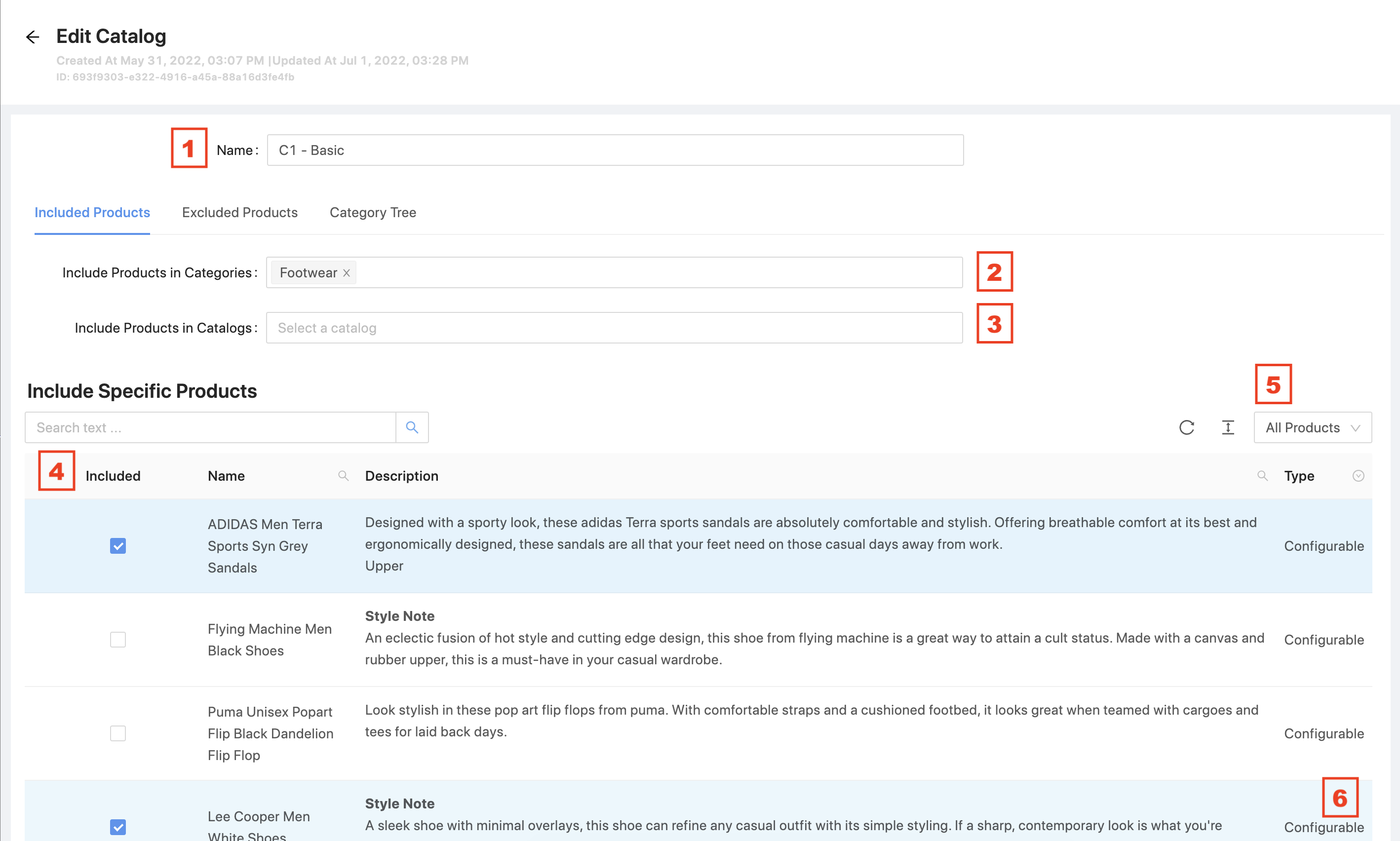
- The name of the catalog (field
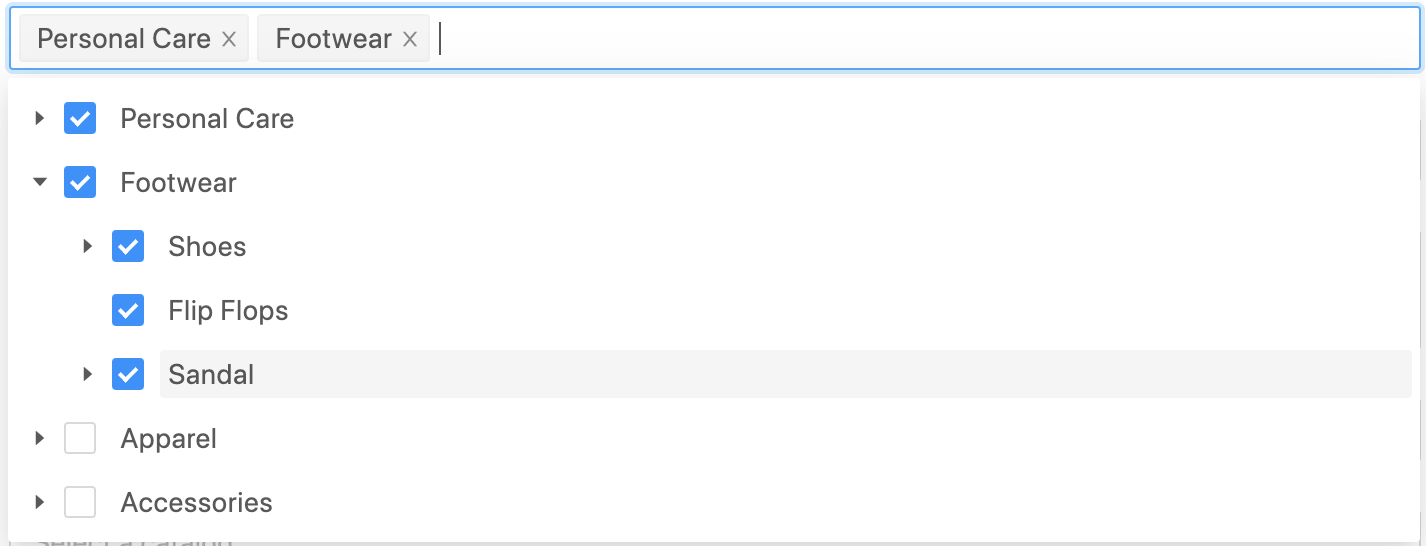
name). - List of categories to include products from (field
includedCategories).
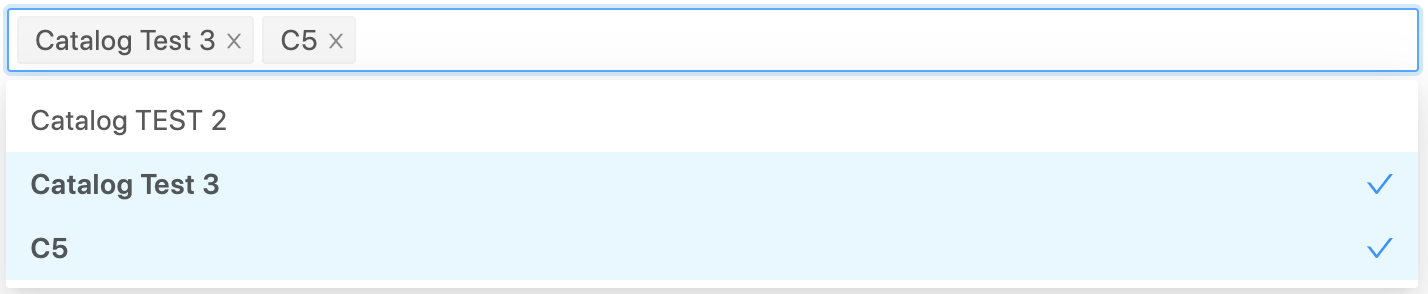
- List of catalogs to include products from (field
includedCatalogs).
- Grid of all products to select specifically which ones are required to be included (field
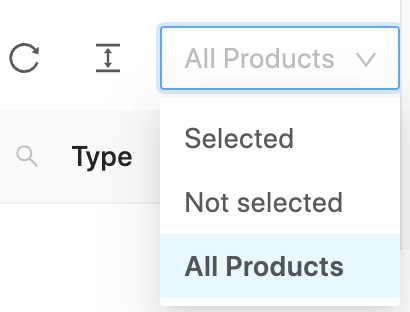
includedProducts). The grid has a column "Included" to check/uncheck products easily for inclusion/non-inclusion. - The product grid can be filtered by its inclusion state showing all included products, all not included, or the full list.
- The product grid has the usual features:
- Configurable pagination.
- Search bar: search work togheter with the state filter with "AND" logic (5).
- Reload and density controls.
¶ Excluded Products Selection
This UI is used to specify the products excluded from the catalog. It is analogous to "Included Products", so details in that specification applies here as well.
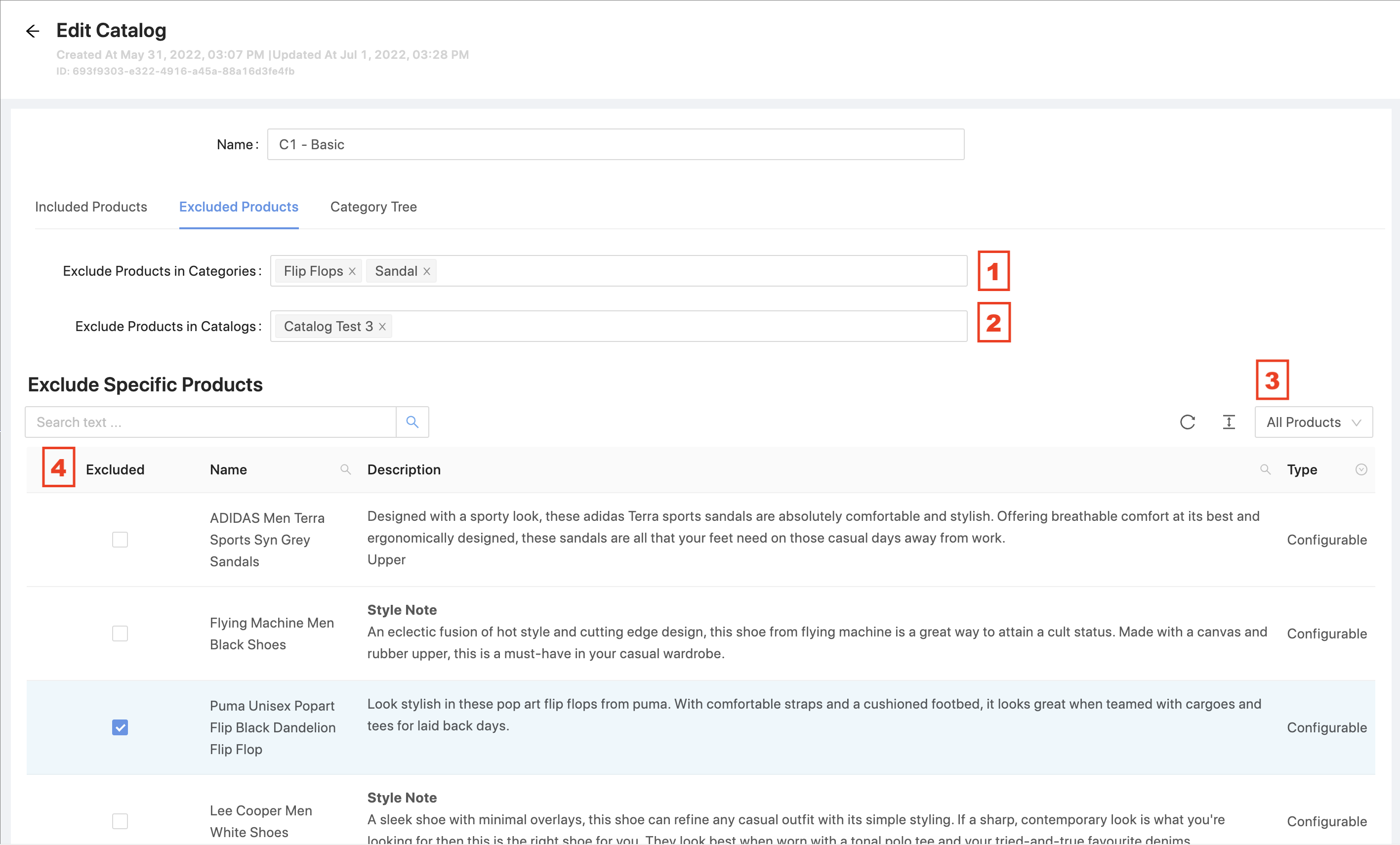
- List of categories to exclude products from (field
excludedCategories).
- List of catalogs to exclude products from (field
excludedCatalogs).
- The product grid can be filtered by its exclusion state showing all excluded products, all not excluded, or the full list.
- Grid of all products to select specifically which ones are required to be excluded (field
excludedProducts). The grid has a column "Excluded" to check/uncheck products easily for exclusion/non-exclusion.
¶ Catalog Category Tree
This UI is used to specify the category tree for the catalog.
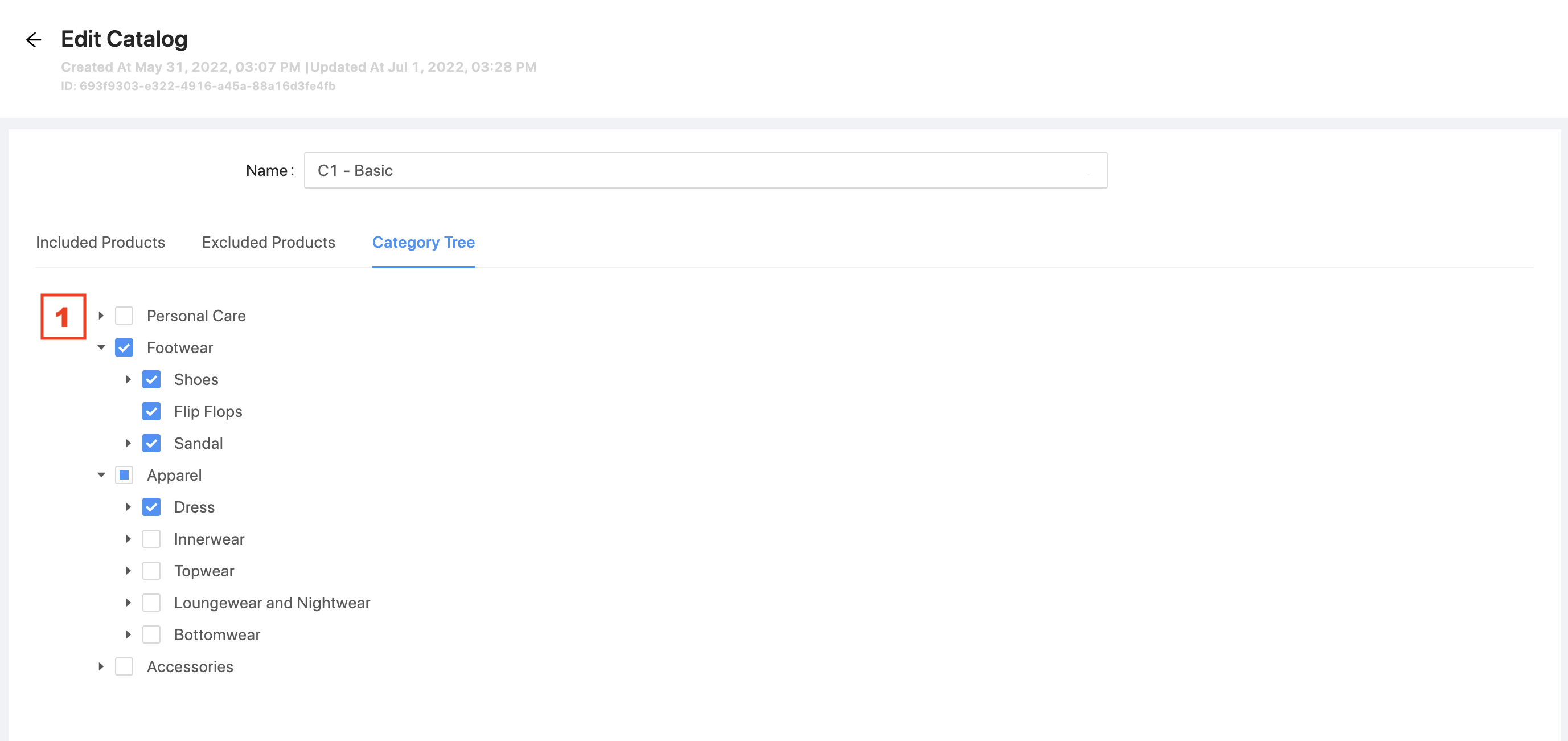
- Categories that will form the category tree of this catalog.
- First version: All main category tree is included in all catalogs.
- Next version: Only values selected in this tab are part of the catalog's category tree.
 Note that there is no API support for this information yet. Even so, the UI can be developed without sending the data to the API.
¶ Future Work
- Design and develop "Catalogs Category Tree" feature to support the information in tab "Catalog Category Tree" to be integrated against the API.
- Design and develop "Tracking of Catalog Processing" so the API users can know the status of a specific catalog.
- UI to show catalog status (requires previous API feature to be developed). Include status badgets like:

Based on Ant Design tag component. - Ownership and Permissions (LEC-1730)