¶ Feature
The main idea is that a customer or employee are able to have and manage multiple active carts. That way different cart creators (for example, an operator and the customer/employee of her/his-own) can create carts for different checkout processes without interfering with each other.
Details
- The customers/employees are able to list and count their own carts
- The guest users are able to list and count their own carts
- The operators are able to list and count any customer/employee's carts
- The operators are able to list and count guest carts
- The customers/employees are able to delete their own carts
- The guest users are able to delete their own carts
- The operators are able to delete any customer/employee's carts
- Creating new carts does not disable other active carts
¶ Admin
¶ List Customer Carts
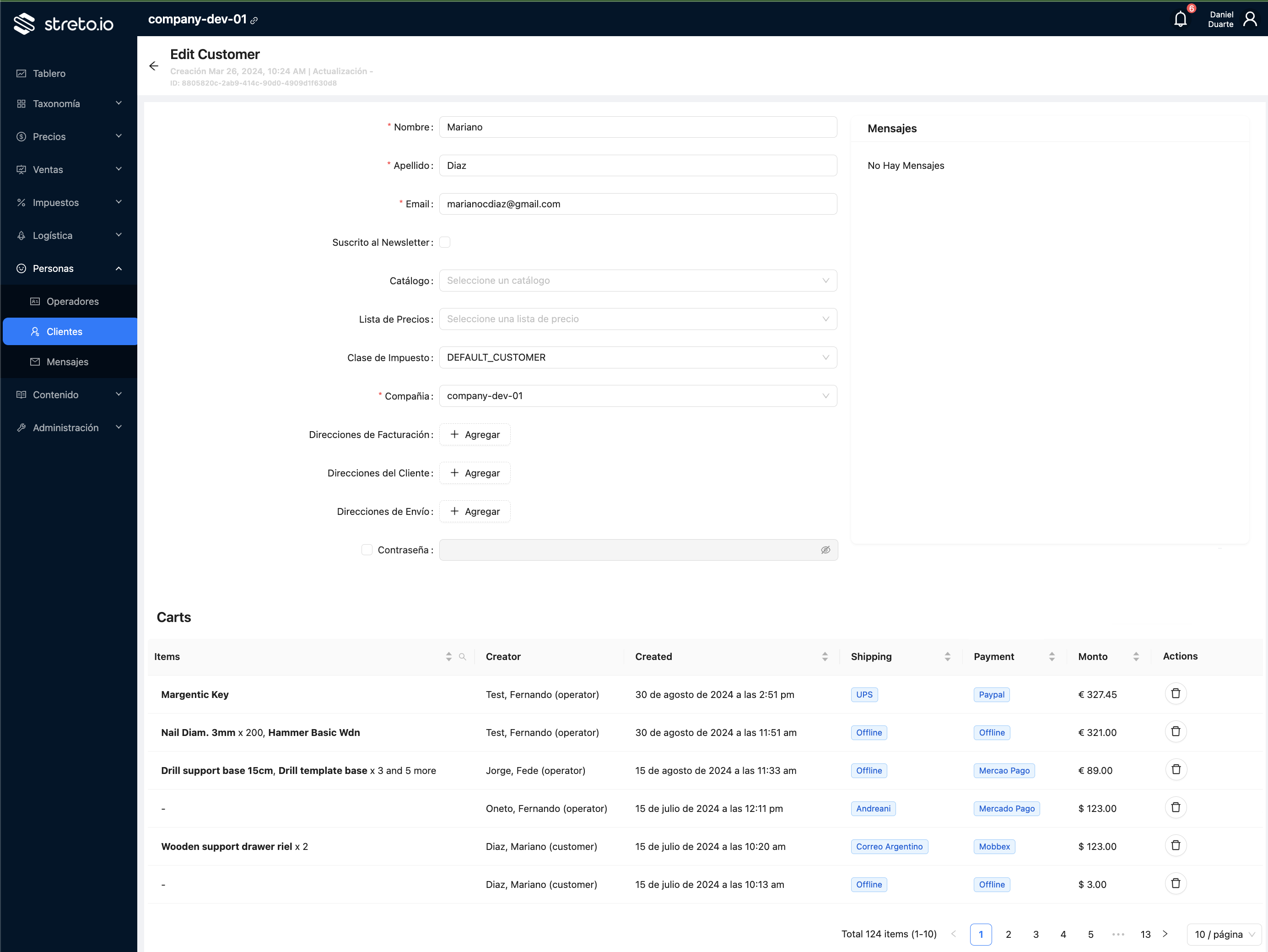
As a part of the Customer form (in edition mode only), there will be a new grid on the botton with all the carts that the customer owns.
The basic cart information is show in these columns:
- Items: A summary of the items in the cart, showing the name of up to two products, and its qty in case of them having having it different to 1. If the cart has more than 2 items, add the legend "and more", indicating how many items more are in cart.
- Creator: Full name and user type of the cart creator.
- Created: Date of cart creation.
- Shipping: The shipping method title in tag format.
- Payment: The payment mehtod title in tag format.
- Monto: The global cart total.
- Actions: Actions column with the buttons to delete carts.
¶ List Guest Carts
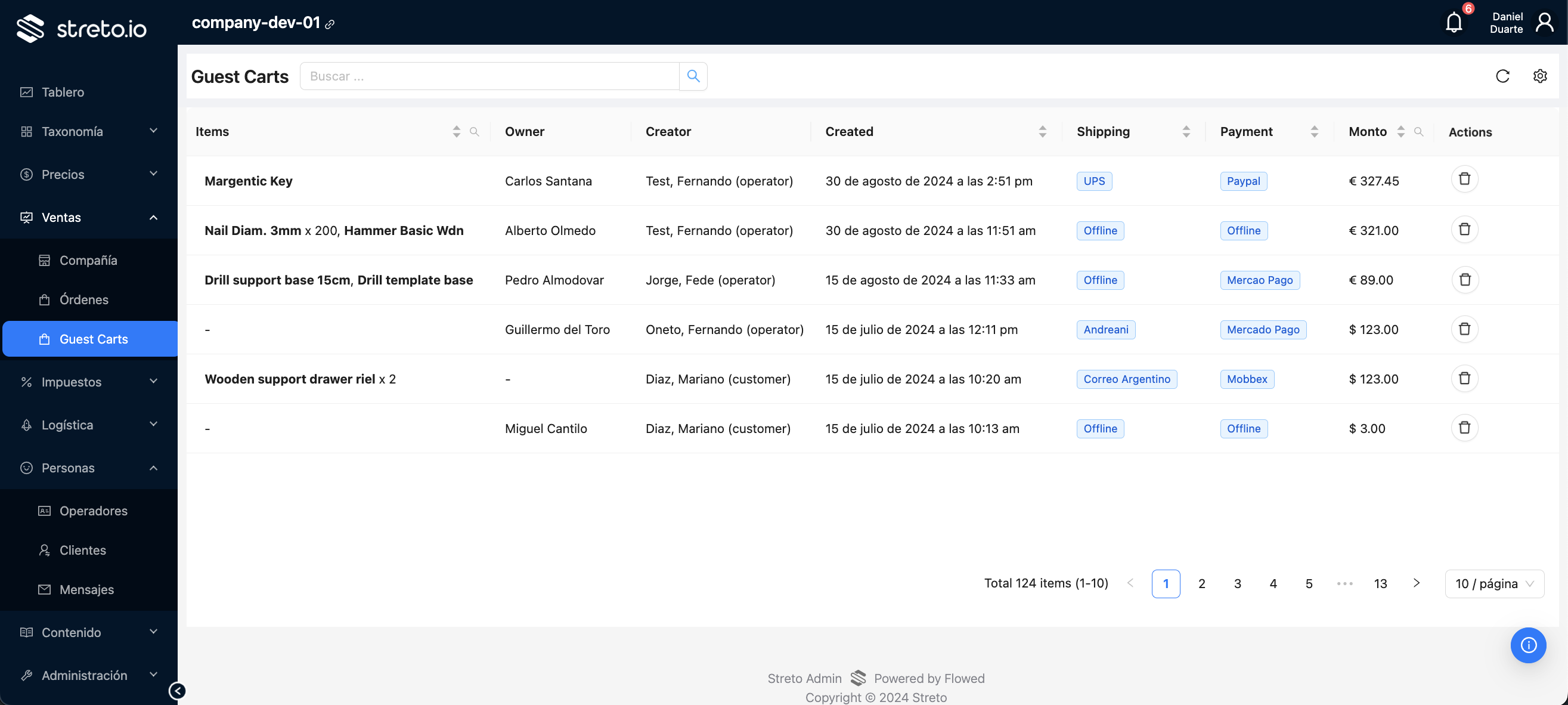
In a new sidebar menu item "Guest Carts" under "Sales", it will be accessible the new grid of guest carts.
The grid show a summary of the carts, with similar columns as the grid in the customer form, plus the information about the owner:
- Items: A summary of the items in the cart, showing the name of up to two products, and its qty in case of them having having it different to 1. If the cart has more than 2 items, add the legend "and more", indicating how many items more are in cart.
- Owner: Full name aof the cart owner (the guest user).
- Creator: Full name and user type of the cart creator.
- Created: Date of cart creation.
- Shipping: The shipping method title in tag format.
- Payment: The payment mehtod title in tag format.
- Monto: The global cart total.
- Actions: Actions column with the buttons to delete carts.
¶ Store
The store will support multiple carts, requiring this changes:
- Replace the usages of the service
GET /carts/minewith the listing serviceGET /carts. - The logic for the cart selection would be to choose the cart of the most recent update date-time, created by the current user.
- For logged in users (customer and employees), there will be a new screen under My Account section with a grid of the own active carts (it will use the listing services
GET /cartsandGET /carts/count). - The carts listed in My Account will be able to be deleted.
- The carts listed in My Account will be able to be updated so the user can select one of them can use for the current checkout process.
¶ POS
The POS will support multiple carts, requiring this changes:
- Use the listing services
GET /cartsandGET /carts/countto retrieve active carts filtering with the selected customer and creator. - In case of having multiple active carts created by the current user for the same customer, the operator would be able to choose with cart will be working on.
¶ API
The backend requires several changes to implement the multi-cart feature:
- Update current
GET /carts/mineto return the last updated active cart for current user. Mark the service as deprecated, so clients know that it will be removed soon. - Remove current logic of automatic de-activation of carts on creation: When a new cart is created, previously created carts for the same user will no be de-activated automatically any more.
- Create listing carts services for guests, customers and employees:
GET /cartsandGET /carts/count. The services will return and count the active carts owned by the calling user. For operators, these services are already available and will continue returning and counting all carts for all owners. - Create a service to delete carts with this specification:
- Signature:
DELETE /carts/{cartId} - Only active carts can be deleted.
- Operators are able to delete any (active) cart.
- Guest users are able to delete only own (active) carts.
- Customers are able to delete only own (active) carts.
- Employees are able to delete only own (active) carts.
- Signature:
- Remove service
GET /carts/minewhen there are no more clients using it. - Create admin sidebar menu item to access Guest Carts grid.