¶ Workflow Diagram V3
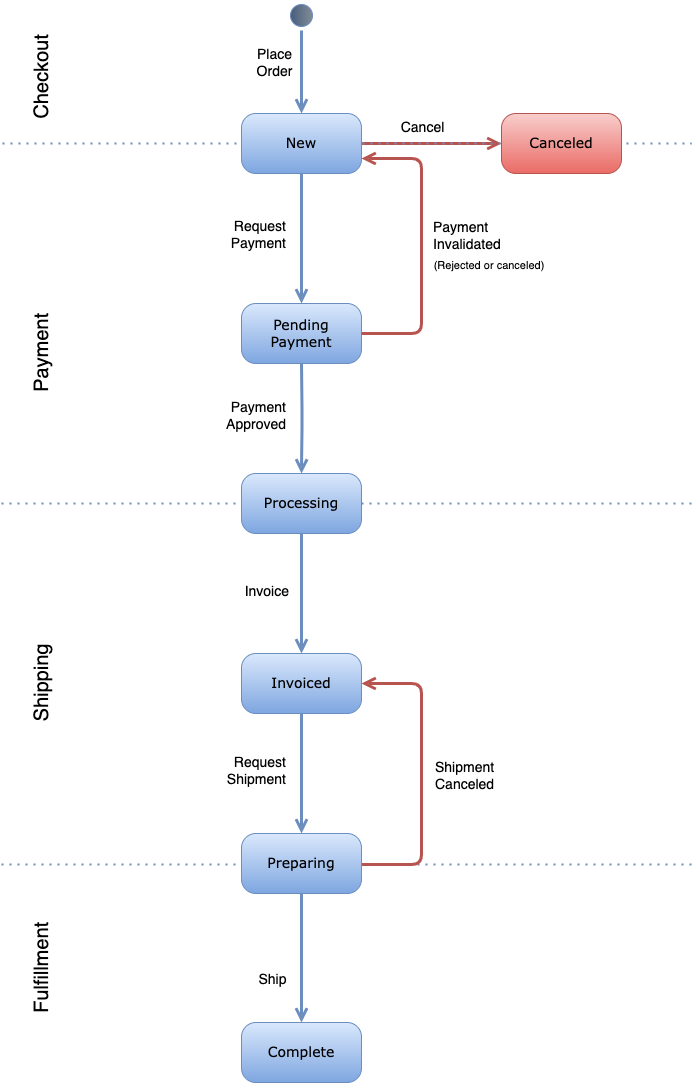
The following diagram shows the version 3 of the order workflow with its states and actions.
¶ States
Order states in the workflow V3.
-
New (
"new"): This is the first state of the order. When the cart place is performed, the order is created in the "New" state, waiting for the payment to be requested. -
Canceled (
"canceled"): This state is reached when the order in state "New" is manually canceled for any reason. This is a final state, which means the order cannot be moved to any other state later. -
Pending Payment (
"pending-payment"): This state is reached when the payment is requested. It means the payment started to be processed and it is waiting for approval or rejection. -
Processing (
"processing"): After the order payment was approved (either including or excluding the capture), the order is moved from "Pending Payment" to "Processing", which means the paymend is accepted and the order is ready to be invoiced. -
Invoiced (
"invoiced"): When the payment was approved and the order is already in "Processing", it can be invoiced being moved to this state, and creating an invoice document. The invoicing process is done manually. Once the order is in this state, its logistic process is ready to be started. -
Preparing (
"preparing"): Once the order is invoiced, the logistics process can be started by requesting a shipment manualually. This way, the order is moved to this state, creating a shipment related to it and, if required by the shipping method, a shipping order is created as well. Once the shipment is performed successfully, the order is moved to the state "Complete". In case the shipment failed, the order is put back in "Invoiced" state, to re-start the logistics process. -
Complete (
"complete"): When the order is in "Preparing", it is waiting to be shipped. When effectively shipped, the order is moved to "Complete". This is a final state, which means the order cannot be moved to other state later.
¶ Actions
The workflow actions are the initiators that trigger the transitions between states.
-
Place Order: The conversion of a cart into an order. It creates the order in "Pending" state. This action can be executed by the buyer (a logged in customer, a guest or an employee in a B2B/B2B2C context), or also by an operator or application user performing the checkout in the name of a customer/employee.
-
Cancel: It is the manual cancelation of an order whose payment has not been requested yet, or a previous payment process was invalidated due to rejection or manual cancelation. Once canceled, the order is moved to the final state "Canceled".
-
Request Payment: Once an order is created, the payment process starts when this action is manually executed. That creates a payment record associated to the order that allows to track the process. When this action is executed the order is moved to "Pending Payment".
-
Payment Invalidated: This action is executed when a payment process is either manually canceled or rejected by a notification from a payment method integration. It moves the order from "Pending Payment" to "New", so it requires a new payment request to process.
-
Payment Approved: This action is executed when received a notification of payment approved from the payment method. It moves the order from "Pending Payment" to "Processing". It can also be ran manually by an operator.
-
Invoice: Executes the invoicing process. Through this action the order invoice is created, and the order is moved from "Processing" to "Invoiced". It is executed manually.
-
Request Shipment: When the order is invoiced, its logistics process is ready to start. The first action to do so is to manually request a shipment. That creates a shipment document associated to the order, and depending on the shipping method, creates a shipping order (for API-based shipping methods). When this action is executed the order is moved to "Preparing".
-
Ship: When the products are delivered to the final consumer, the ship action is executed, and the order is moved to "Complete".
-
Shipment Canceled: In case a shipping request was performed, and the shipment failed, it is cancelled and the order goes back to the previous state "Invoiced" to try again.
-
Comment: In any state of the order, a comment can be added to it without affecting its status. For simplicity, this action is not shown in the diagram.
¶ Limitations
These are the limitations of the workflow v1, and related future work for new versions.
-
Supports only physical orders
Future versions features:- Support for virtual orders without the logistics states and actions.
-
Supports only one payment method for the total of the order.
Future versions features:- Support for multiple payment methods for the same order.
-
Performs total invoicing for the whole order.
Future versions features:- Support for partial invoicing, meaning multiple invoices for the same order.
-
Supports only manual shipment (from an operator) for the whole order.
Future versions features:- Support for automatic shipment according to different shipping methods.
- Support for multiple partial shipments in the same order.
-
Does not support approval flows.
Future versions features:- Support for approval flows to implement in B2B orders.